

How To Get More Google Reviews (The Right Way)

Your competitor down the street has 200 Google reviews. You have 14. And right now, a potential customer is choosing between you – without ever calling either of you. They’re looking at those numbers and clicking away.
That’s how Google reviews work in 2024. They make the decision before you even get a chance to speak. If your review count is low or your rating has slipped, you’re losing customers on autopilot – every single day.
Knowing how to get more Google reviews is no longer a nice-to-have for small business owners. It’s as important as answering the phone. Reviews determine how high you show up in local search, whether people trust you enough to click, and whether they call you or the business next to you.
This guide gives you a practical, step-by-step system for how to generate Google reviews consistently – without shortcuts, without risking your listing, and without violating a single Google policy.
How To Get More Google Reviews (Without Violating Google’s Rules)
Why Google Reviews Matter More Than You Think
Before we get into how to increase Google reviews, you need to understand what’s actually at stake.
They directly affect your Google Maps ranking
Reviews are one of the strongest signals Google uses to rank local businesses. Volume, recency, and rating all play a role. If you want to rank higher on Google Maps, building a steady stream of reviews is one of the most reliable ways to do it.
They change who clicks on your listing
Imagine two plumbers appear in a local search. One has 11 reviews and a 3.8 rating. The other has 94 reviews and a 4.7. The second one gets the click almost every time. Reviews are the first thing potential customers see – before your website, before your photos, before your description.
They build trust before the first phone call
A new customer doesn’t know you. Reviews are how they decide if you’re the kind of business they can trust. A consistent stream of positive, recent reviews tells them: other people took a chance on this business and it worked out. That’s a powerful signal that converts browsers into callers.
They convert more leads into paying customers
Businesses with strong review profiles close more leads at a higher rate – even when their prices are higher than competitors. Reviews reduce risk in the customer’s mind. The easier you make it for someone to feel confident about choosing you, the more often they will.
How To Get More Google Reviews: Step-by-Step Process
Follow these steps to build a steady, compliant review generation system that works consistently over time.
Step 1: Claim and optimize your Google Business Profile
Goal:
Make sure your listing is verified, complete, and accurate before you ask anyone for a review.
Action:
Log into Google Business Profile (business.google.com), claim your listing if you haven’t already, and fill out every section – business name, address, phone, hours, services, photos, and business description. An incomplete profile signals an inactive business.
Expected outcome:
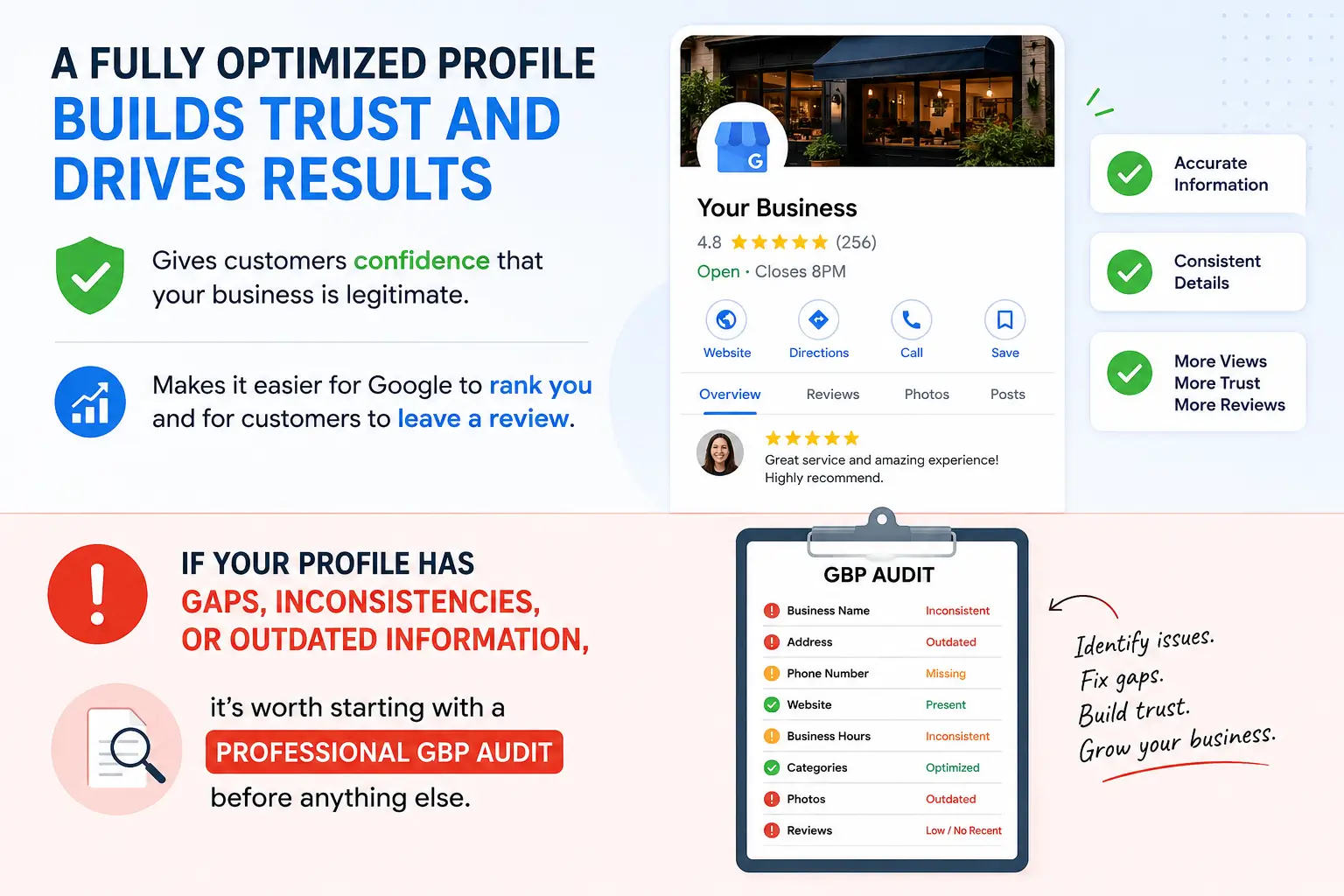
A fully optimized profile gives customers confidence that your business is legitimate. It also makes it easier for Google to rank you and for customers to leave a review.
If your profile has gaps, inconsistencies, or outdated information, it’s worth starting with a professional GBP audit before anything else.
Step 2: Create a simple review request process
Goal:
Turn asking for reviews from a one-off task into a repeatable, team-wide system.
Action:
Decide exactly when and how you’ll ask every customer. Write a short script for yourself and any staff. Keep it simple: “We’d really appreciate it if you shared your experience on Google. It takes about one minute and helps our small business. Here’s the direct link.”
Expected outcome:
A consistent process means you stop relying on memory or mood. You ask every customer, every time. That’s how review volume grows steadily month over month.
Step 3: Ask customers at the right moment
Goal:
Reach customers when satisfaction is highest – before the moment passes.
Action:
Ask right after the job is done, the appointment ends, or the service is complete. In-person is the most effective. If that’s not possible, send a message within a few hours. Not the next day. Not a week later.
Expected outcome:
Customers who are asked when they’re still feeling positive about your service are far more likely to follow through. Timing is everything with review requests.
Step 4: Send a direct Google review link
Goal:
Remove every possible barrier between the happy customer and the review form.
Action:
Go to your Google Business Profile, copy your review link (under ‘Get more reviews’), shorten it with a tool like bit.ly, and send that link directly in your message. Put it on your invoices, receipts, and business cards too.
Expected outcome:
When customers don’t have to search, navigate, or figure out where to go, they actually leave the review. Every extra step you remove increases your conversion rate.
Step 5: Respond to every single review
Goal:
Show customers and Google that you’re an engaged, responsive business.
Action:
Respond to every review within 24 to 48 hours. For positive ones, thank the customer and mention something specific about their visit or job. For negative ones, stay calm, acknowledge the issue, and offer to take it offline.
Expected outcome:
Responding to reviews builds trust with future customers who read them. It also signals to Google that your listing is active, which supports your local rankings.
Step 6: Follow up professionally – once
Goal:
Give customers who forgot a gentle second chance.
Action:
If someone didn’t respond to your first ask, send one soft follow-up 5 to 7 days later. Keep it short and warm: “Just a quick note – if you have a moment, a Google review would mean a lot to us. Here’s the link.” One follow-up only. Never more.
Expected outcome:
A single professional reminder can recover a significant number of missed reviews. Multiple reminders cross a line and can damage the relationship and your reputation.
Step 7: Monitor and manage your reviews consistently
Goal:
Stay on top of your reputation so issues don’t go unnoticed.
Action:
Check your Google Business Profile at least twice a week. Respond to new reviews, flag any that violate Google’s policies, and track your overall rating trend over time.
Expected outcome:
Businesses that actively manage their reviews maintain a stronger reputation, catch problems early, and build a growing base of trust that drives consistent leads.
If managing this consistently feels like too much alongside running a business, a professional reputation management service can handle the monitoring, responses, and reporting for you.
Practical Ways To Ask for Reviews (Without Feeling Pushy)
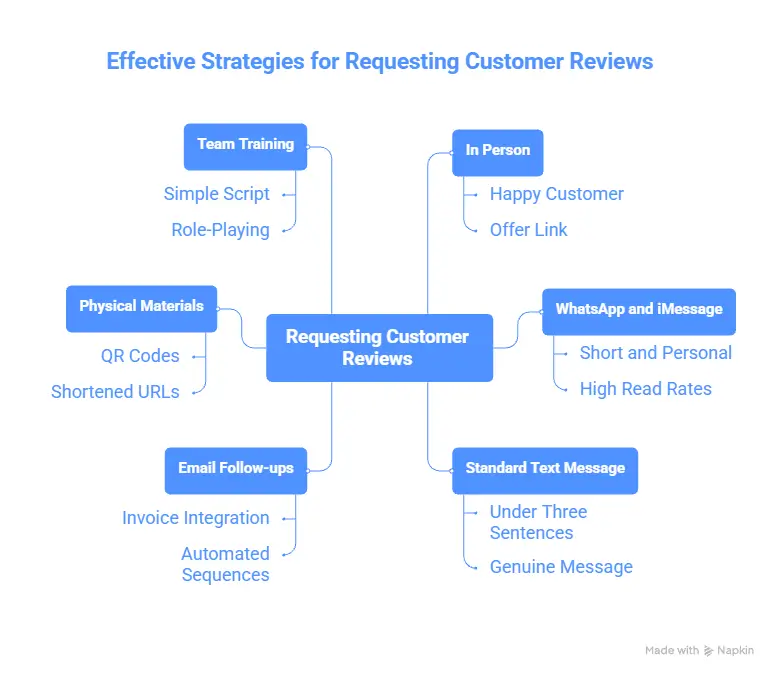
Most business owners know they should ask. The problem is they don’t know how to do it without feeling awkward or coming across as desperate. Here are the approaches that actually work:
In person, right after the job
This is the highest-converting method. When you’ve just finished a job and the customer is clearly happy, say something like: “It was great working with you. If you have a moment, an honest Google review would mean a lot to our small business. I can send you the link right now if that’s easier.”
Most people will say yes. And if you offer to send the link immediately – right there on the spot – the chances of follow-through go way up.
WhatsApp and iMessage
For many small businesses – especially trades, home services, and medical practices – WhatsApp and iMessage are the primary communication channels. If that’s how you already talk to your customers, that’s exactly where your review request should go.
Keep it short, personal, and direct. A message like this works well:
“Hi [Name], great to work with you today. If you get a chance, we’d really appreciate a quick Google review – it helps us a lot. Here’s the direct link: [your link]”
WhatsApp has especially high read rates compared to email. If a customer is already talking to you there, they’re far more likely to see – and act on – a review request sent via that channel.
Standard text message (SMS)
For customers not on WhatsApp or iMessage, a standard SMS works just as well. Keep it under three sentences. Include the direct link. Don’t overthink the wording. A short, genuine message beats a polished template every time.
Email follow-ups
If you send invoices or job summaries by email, add a short review request at the bottom. Not a whole section – just a line with the link. For businesses with higher transaction volume, automated email follow-up sequences work well for consistent review generation.
Invoices, receipts, and business cards
Print your Google review link as a QR code or shortened URL on any physical materials you hand customers. A dentist can put it on appointment reminder cards. A plumber can put it on the invoice. A roofer can put it on the completion certificate. Low effort, but surprisingly effective.
Train your team to ask
If you have staff who interact with customers, they need to know how to ask too. Write a simple script. Role-play it once in a team meeting. Make it part of the standard closing routine for every job, appointment, or service call.
What NOT To Do: Google’s Review Rules and the Risks of Breaking Them
Before you start, you need to know what Google prohibits. These aren’t technicalities – violations can get reviews removed, damage your listing, or result in your profile being penalized entirely.
If your listing has already been affected, read our guide on what to do when your Google Business Profile gets suspended.
Buying reviews
Paying anyone – a customer, a service, or a freelancer – to leave a review is a direct violation. Google’s systems are built to detect this, and the consequences range from review removal to listing suspension.
Fake or fabricated reviews
Having employees, friends, or family write reviews as if they were real customers is prohibited. Google’s algorithms flag unusual review patterns, and fake reviews can be removed in bulk – including ones you earned legitimately.
Review gating
Review gating means filtering customers before asking – sending happy ones to Google and routing unhappy ones to private feedback instead. Google explicitly bans this. You must give all customers the same opportunity to leave a public review.
Incentivizing reviews
Offering discounts, gifts, entries to a prize draw, or any reward in exchange for a review is against Google’s policies. Even if you intend it as a thank-you, it creates a bias that undermines the review’s integrity.
Employee reviews
Asking current employees to review your own business is a conflict of interest and is not allowed. This includes asking staff to review from their personal accounts.
Bulk review requests from one location
Sending dozens of review requests from the same IP address or device in a short period can trigger Google’s spam filters. Build your review volume gradually and consistently – not in sudden bursts.
If a review disappears, it’s not always a policy violation – sometimes it’s a Google algorithm issue. Our guide on Google reviews being removed explains what’s happening and what you can do about it.
Common Mistakes Businesses Make With Google Reviews
Even business owners who are doing everything else right make these mistakes. Check your own process against this list:
- Asking occasionally instead of consistently – Sporadic requests lead to sporadic results. You need review volume growing steadily month over month, not in random bursts.
- Asking everyone all at once – A sudden spike in reviews can look suspicious to Google’s algorithm. A slow, steady stream always outperforms a bulk campaign.
- Never responding to reviews – Silence tells potential customers you don’t care. Always respond, including to positive ones.
- Ignoring negative reviews – An unanswered negative review does more damage than the review itself. A calm, professional response shows accountability and builds trust.
- Not having the link ready – ‘Just search for us on Google’ loses most customers before they get there. Always have your direct link ready to send.
- Treating it as a one-time push – Recency matters. A profile with 40 reviews from three years ago and nothing recent looks inactive. Consistency is the only thing that works long-term.
- Skipping Google Business Profile optimization – Asking for reviews on a weak, incomplete profile is wasted effort. Fix the profile first.
- Sending review requests only by email – If your customers are on WhatsApp or iMessage, that’s where your request needs to go. Match your channel to how your customers actually communicate.
If you’re unsure where your profile stands, a GBP audit can quickly identify the gaps that are costing you rankings and reviews.
Frequently Asked Questions
How many Google reviews do I need to rank well?
There’s no magic number. What matters is that you have more recent, high-quality reviews than your local competitors. In smaller markets, 20 to 30 may be enough. In competitive cities, you may need significantly more. Recency and consistency matter as much as total count.
Can I ask every customer for a review?
Yes – and you should. Google doesn’t restrict who you ask. The only rule is that you ask everyone equally and don’t filter based on expected satisfaction. Make it a standard part of every job close.
Is it okay to ask for reviews via WhatsApp?
Yes, absolutely. Asking for reviews via WhatsApp, iMessage, or SMS is fully compliant with Google’s policies. In many industries – especially trades, healthcare, and local services – messaging apps have higher response rates than email. Use the channel your customers already respond to.
What if a customer leaves a fake or unfair negative review?
Flag it in your Google Business Profile if it violates Google’s content policies. Google won’t remove reviews just because you disagree with them. For reviews that stay, respond professionally. A well-written, calm response often reassures potential customers more than the negative review hurts you.
Does my star rating affect my Google rankings?
Yes, though it’s one of many signals. A very low rating – below 3.5 – can reduce click-through rates and conversions even if you rank well. The goal is a healthy volume of reviews combined with a strong average rating, ideally 4.0 or above.
How do I get my Google review link?
Log into Google Business Profile at business.google.com. Find the ‘Get more reviews’ option on your profile dashboard. Copy that link, shorten it with bit.ly or a similar tool, and save it somewhere you can quickly paste it into any message.
What’s the fastest compliant way to generate Google reviews?
Ask every customer in person right after service, then immediately send them the direct review link via their preferred messaging app – WhatsApp, iMessage, or SMS. No waiting, no hoping they’ll remember. The combination of an in-person ask plus an instant link is the most reliable way to generate Google reviews consistently.
Should I respond to positive reviews too?
Yes, always. Responding to positive reviews shows professionalism and keeps your listing active. It also shows future customers that you appreciate the people who trust you with their business. Keep responses warm, specific, and brief.
Ready to build a review system that runs on autopilot?
If generating reviews consistently feels like one more thing on an already full plate, you don’t have to figure it out alone. Most business owners see a significant difference when they stop winging it and put a structured process in place.
At Spark Local HQ, we help local businesses build review systems, manage their online reputation, and keep their Google Business Profile optimized – so they show up, get clicked, and win more customers.
Start with a free GBP audit to see exactly where your profile stands. Or explore our reputation management service and GBP management service to see how we can take this off your hands entirely.
Conclusion
Knowing how to get more Google reviews is one of the highest-leverage skills a local business owner can build. Reviews determine your visibility, your credibility, and whether a stranger picks up the phone and calls you or your competitor.
The businesses that win this game aren’t the ones with the best service. They’re the ones with a system. Ask consistently, use the channels your customers actually respond to – whether that’s WhatsApp, iMessage, or SMS – send a direct link, respond to every review, and do it over and over.
Avoid shortcuts like buying reviews or incentivizing customers. The risk is never worth it. Instead, focus on proper Google Business Profile optimization and a consistent outreach process – that’s the combination that compounds over time.
If you want to get better Google reviews over time, consistency beats any shortcut
Start today. Your competitor already has a head start.

About the Author
SparkLocal HQ Team
The SparkLocal HQ team helps local businesses across the US, UK and beyond get found on Google. We specialise in Google Business Profile management, reinstatement, and local SEO that drives real calls and customers.
Was this article helpful?
Keep Reading
Related Articles
Need help with your Google Business Profile?
Free audit — we'll find exactly what's holding your profile back.